OUR SERVICES

Headless CMS Agency - Content Without Constraints

We build headless CMS architectures that decouple content management from content delivery. Kultrix helps you choose the right CMS, Strapi, Sanity, Contentful, or Payload, and integrates it seamlessly with your Next.js, Nuxt, or any frontend of your choice.

Next step: get your project scoped

Tell us what you are building - what exists today, what it has to do and when it has to be live. We come back with the questions we need answered and a scoped estimate instead of a range.

Describe your project

EXPERTISE

Our Tech Stack

Strapi
Sanity
Contentful
Next.js
GraphQL
TypeScript

OUR APPROACH

Flexible Engagement Models

Choose the cooperation format that best fits your business goals and development velocity.

Startups

MVP Development

Fast launch to test your idea and gather user feedback with minimal investment.

What's included

  • Core feature development
  • Basic UI/UX design
  • Stable performance

Timeline Typically 9-16 weeks

Businesses

Full App Build

Complete cycle from initial strategy and design to final launch.

What's included

  • Custom architecture & design
  • Seamless team integration
  • Production-ready release

Timeline Typically 20-40 weeks

Enterprises

Team Extension

Scale your team with expert developers to accelerate development.

What's included

  • Senior-level developers
  • Seamless team integration
  • Flexible management

Timeline Flexible / Long-term

OUR PROCESS

How We Work

We specialize in creating user-centered & innovative solutions. Delivering seamless digital experiences.

Discovery
ResearchFlow MapUser Interview
Solution
ArchitectureWireframesPrototyping
Development
Sprint CyclesCode ReviewQA Testing
Launch
DeploymentMonitoringHandoff

EXPERT INSIGHTS

Headless CMS vs Traditional CMS

A headless CMS separates content from presentation, enabling editors to manage content once and deliver it everywhere.

Go With Headless CMS

  • Omnichannel delivery

    One content repository feeds web, mobile, email, and kiosks via API.

  • Frontend freedom

    Build with any framework - Next.js, Vue, mobile, or static sites.

  • Future-proof

    Add new channels without migrating or re-entering content.

  • Developer experience

    Typed content APIs integrate cleanly with modern toolchains.

Go With Traditional CMS (WordPress)

  • All-in-one

    Hosting, rendering, and content management in one product.

  • Non-technical editors

    Visual page editors require minimal training.

  • Theme ecosystem

    Thousands of themes for instant visual starting points.

  • Plugin marketplace

    Forms, SEO, e-commerce, and more via a plugin ecosystem.

EXPERT GUIDANCE

Headless vs Traditional CMS

Headless CMS

Content Delivery

API-first - any frontend or channel consumes it.

Frontend Stack

Freely choose React, Vue, Svelte, or mobile.

Performance

Static generation + CDN = sub-100ms TTFB.

Editor Experience

Structured fields; preview requires custom setup.

Scalability

Scale content API and frontend independently.

Best For

Multi-channel products, design-driven sites, fast blogs.

Traditional CMS

Content Delivery

Tightly coupled to the CMS rendering engine.

Frontend Stack

Constrained to PHP templates or REST-only headless plugins.

Performance

Dynamic PHP rendering is slower without heavy caching.

Editor Experience

WYSIWYG visual editing familiar to all editors.

Scalability

Vertical scaling of the monolith server.

Best For

Simple sites where editors need visual independence.

DELIVERABLES

What You Get

CMS Selection Report

CMS Selection Report

Evaluated comparison of CMS options against your content model, team, and budget.

Content Architecture

Content Architecture

Structured content model with types, relationships, and editorial workflow design.

API Integration

API Integration

Type-safe REST or GraphQL client connecting your frontend to the headless CMS.

Preview Mode

Preview Mode

Draft content preview on the live frontend before publishing, with editor toolbar.

Webhook Pipeline

Webhook Pipeline

On-publish webhooks triggering ISR revalidation or CDN cache purge within seconds.

Editor Training

Editor Training

Documentation and training session for content editors on the new CMS workflow.

INDUSTRIES

Tailored Solutions for Your Specific Industry

We build powerful digital experiences across various sectors, ensuring your product meets unique market demands.

(01)

Fintech

Data-driven commerce solutions that improve journeys, boost sales, and optimize operations.

(02)

Retail

Data-driven commerce solutions that improve journeys, increase sales, and optimize operations.

(03)

Healthcare

Reliable medical platforms that protect patient data, simplify workflows, and support clinical accuracy.

(04)

B2B SaaS

Product-driven platforms that enhance workflows, automate processes, and scale with your business.

CASE STUDIES

Our Recent Work

View All

START YOUR PROJECT

Ready to build with expert Headless CMS team?

Expert developers ready to deliver high-quality digital products.

FAQ

Frequently Asked Questions

A headless CMS stores and manages content but has no built-in frontend. Instead it exposes content via APIs (REST or GraphQL) that any frontend can consume - a Next.js site, a mobile app, a digital signage screen. The "head" (frontend) is decoupled, giving developers complete control over the user experience.

Headless CMS gives you frontend freedom (any framework, any design), omnichannel content delivery (web, mobile, IoT), better performance (static generation from API data), and the ability to swap frontends without migrating content. The trade-off is more complexity compared to traditional monolithic CMS.

Strapi is best for teams wanting self-hosted, open-source, and no per-content pricing. Sanity excels for complex content relationships and real-time collaborative editing. Contentful offers enterprise reliability, global CDN, and the widest ecosystem of integrations. Kultrix evaluates your specific needs before recommending.

Payload is a newer TypeScript-native headless CMS that runs alongside your Next.js app - no separate server required. It is code-first (schema defined in TypeScript), fully self-hosted, and generates a complete admin UI from your schema. Kultrix uses Payload when teams want CMS and app in the same repository.

We generate TypeScript types from the CMS API schema, create a typed API client module, and use Next.js data fetching (getStaticProps, generateStaticParams, or server components) to pull content at build time or request time depending on the page type.

We implement Next.js Draft Mode (formerly Preview Mode) - a cookie-based mechanism that switches the frontend to fetch draft content from the CMS instead of published content. Editors click a preview button in the CMS and see their unpublished content in context.

With ISR and webhook-triggered revalidation, content changes appear on the frontend within 5-30 seconds of publishing. We configure CMS webhooks to call Next.js revalidation endpoints, which purge the CDN cache for the affected pages without a full rebuild.

Yes. Kultrix performs WordPress-to-headless migrations - exporting WordPress content, mapping it to the new CMS content model, importing programmatically, and redirecting old URLs. We preserve SEO metadata and validate content completeness before switching over.

Headless CMS platforms support reference fields that link content types - e.g., an Article references multiple Authors and a Category. We design the content model to reflect real editorial relationships, enabling efficient querying and preventing content duplication.

Yes. All major headless CMSs support localization. We configure locale-specific content fields, set default and fallback locales, wire up locale-aware API queries, and integrate with the Next.js i18n routing system for URL-based locale switching.

We configure the CMS to store media in Cloudinary or AWS S3, apply image transformation parameters for WebP delivery at the correct dimensions, and implement responsive images in the frontend with srcset to serve the smallest appropriate image per device.

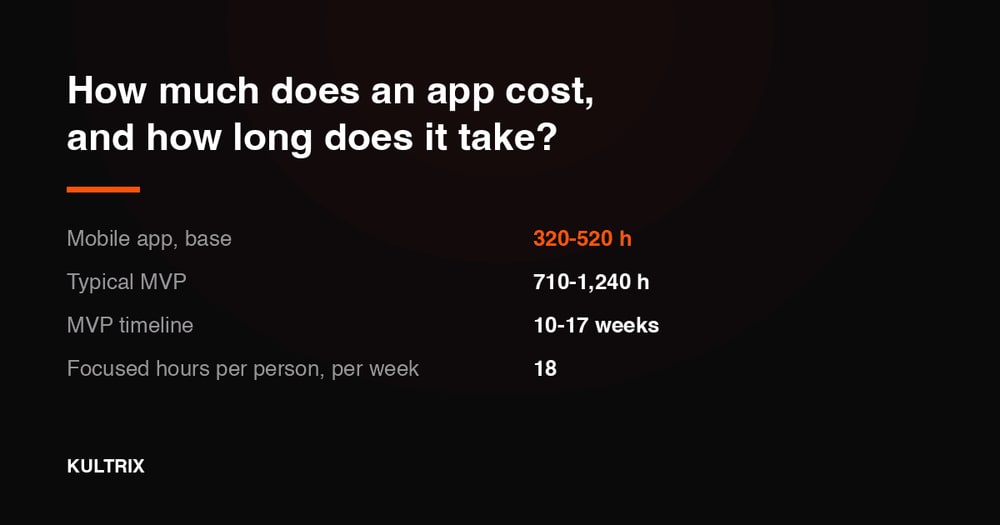
A headless CMS setup - content modelling, API integration, frontend connection - is the content module in our estimate at 70-140 hours, which is why it rarely stands alone: it lands inside a web build rather than beside one. A full migration off a monolithic CMS, with content import and editorial training, takes 6-12 weeks. Price the content module against the rest of your scope at kultrix.com/cost-calculator.