7 React Native Trends Every Mobile Developer Should Know in 2026
React Native in 2026: the new architecture without the bridge, AI-assisted code, web and desktop targets, on-device AI and compliance, with hours for each.
Oleksandr Padura·Founder & CEO at Kultrix·Updated September 24, 2026
Building something like this? Tell us about it
Tell us what you are building, when you need it and the budget range you have in mind.
Key Takeaways
The new architecture drops the bridge, so long lists, gestures and animations no longer need a native rewrite to feel right.
AI assistants absorb the boilerplate - navigation, store wiring, test scaffolding - and leave the domain logic and the integrations, which is where the hours go.
React Native Web and the desktop targets put one codebase on phone, browser and desktop, so the module list decides the budget rather than the number of platforms.
On-device AI, offline-first sync and compliance are now asked for by name, and each one is a separate module with its own testing.
Each trend here is a module with hours on it: an AI module is 150-340 hours, offline mode and sync is 80-160 hours, third-party integrations are 70-180 hours and compliance for GDPR, PCI or HIPAA is 80-200 hours.
Your React Native development strategy needs a complete overhaul for 2026. The framework that once promised "write once, run anywhere" has evolved into something far more sophisticated, with AI-powered code generation, near-native performance optimizations, and development workflows that would have seemed impossible just two years ago.
Adoption and speed-up numbers get quoted in every article on this subject and checked in almost none, so this one does not lean on them. The decision needs something narrower anyway: the framework itself is no longer the risky part of a cross-platform build. What is left to decide, and to pay for, sits in the ecosystem around it.
Those are framework numbers. Here are ours, the ones a budget is actually signed against. Price your own module list if your scope is different.
The only percentages left on this page come from that same model: how work splits across roles, and what design depth and a compressed schedule do to the volume. Market percentages we could not trace to a source used to be here and are not any more.
AI-Powered Code Generation Transforms React Native Development
GitHub Copilot and similar AI assistants have fundamentally changed how developers write React Native code. Instead of manually crafting components from scratch, developers now describe functionality in plain English and watch as complete, functional components materialize.
The gains are concentrated in boilerplate: navigation setup, store wiring, form handling, the parts of a screen that look the same in every app. The more useful shift is that assistants now flag performance problems while the code is being written, instead of after a profiler run three weeks later.
Smart Component Generation
Modern AI tools understand React Native's component lifecycle and automatically suggest optimizations like memo wrapping for expensive renders and lazy loading for heavy components. They even catch common anti-patterns before they make it into production.
For teams working with complex state management, AI assistants now generate Redux toolkit slices, Zustand stores, and even suggest when to use React Query for server state. The fundamentals of React development remain crucial, but AI handles the repetitive implementation details.
Automated Testing and Documentation
AI doesn't just write code - it writes tests. Modern tools generate complete test suites that cover edge cases human developers often miss. They create unit tests for individual components, integration tests for complex flows, and even end-to-end tests that simulate real user interactions.
Documentation generation has become equally automated. AI analyzes your component props, generates TypeScript interfaces, and creates complete README files that actually stay up-to-date with code changes.
Performance Optimization Reaches New Heights
React Native's performance story has completely changed in 2026. The new architecture, combined with Hermes engine improvements, delivers performance that's indistinguishable from native apps in most use cases.
Fabric renderer eliminates the bridge bottleneck that plagued earlier versions. Components talk to native modules directly rather than posting messages across a serialised bridge. The difference shows up first in long lists, gesture handling and animations, the three places where the old architecture was easiest to catch out.
Where Memory Wins Come From
Memory is where the remaining wins are, and none of them arrive on their own. Image sizing, what stays mounted off-screen, which lists are virtualised: those are decisions somebody makes in your code. A leak that ate a session before the New Architecture still eats a session after it if nothing in the code changed.
This is the point where an article usually prints a table of cold start times and bundle sizes. We did not measure those on your app, and neither did the article you read them in, so the table is not here. Benchmark your own build before and after the new architecture: it takes an afternoon and the number you get is about your code.
What we can put a figure on is what performance work costs when it is a line in an estimate rather than a claim in a blog post. Profiling, list virtualisation, image handling and bundle work is a module of 50-110 hours in our own numbers. It is also one of the few modules worth buying late rather than early, because you need real screens and real data before you know which of them is slow.
Real-Time Performance Monitoring
New monitoring tools provide real-time insights into app performance across different devices and network conditions. Teams can identify performance bottlenecks before users experience them, with automated alerts for memory spikes, slow renders, and network timeouts.
The monitoring extends beyond technical metrics. Tools now track user engagement patterns, identifying which features cause users to abandon the app and which keep them engaged. This data directly informs development priorities.
Cross-Platform Development Gets Smarter
The promise of "write once, run anywhere" finally delivers in 2026, but with important nuances. Smart platform detection automatically adjusts UI components, animations, and even business logic based on the target platform.
React Native now ships with adaptive components that automatically follow platform design guidelines. A button component renders as Material Design on Android and follows iOS Human Interface Guidelines on iPhone, without any additional code.
Platform-Specific Optimizations
The framework's intelligence extends beyond visual differences. Network requests automatically adapt to platform capabilities - using iOS's background app refresh on iPhone and Android's work manager for background tasks. Battery optimization happens automatically, with the framework choosing the most efficient APIs for each platform.
For teams considering their development approach, our guide on mobile app development services covers the decision factors between React Native and native development in detail.
Web and Desktop Expansion
React Native's reach has expanded beyond mobile. React Native Web puts the same components in a browser, and what does not carry over is predictable: navigation, layout for wide screens, and anything that reached for a native API. In our own estimates, adding web to the compliance-grade module list below moves it from 1,190-2,340 hours to 1,440-2,740 hours. Real work, but not a second project.
Desktop support through React Native Windows and macOS means truly universal applications. The same codebase that powers your mobile app can create desktop applications that feel native to each operating system.
Need Expert Development Help?
Our team builds high-performance web and mobile applications for startups and enterprises.
A mobile app with accounts and payments: 590-1,000 hours and 8-14 weeks in our own estimate model.
Development Workflow Revolution
The developer experience has changed completely. Hot reloading now works reliably across all platforms, with changes appearing instantly on connected devices. The new development server automatically detects device connections and pushes updates without manual intervention.
Cloud-based development environments eliminate the need for complex local setups. Developers can start coding React Native apps directly in their browser, with full access to simulators and real device testing. This approach particularly benefits distributed teams and contractors.
Integrated Testing Workflows
Testing happens continuously throughout development. Every code change triggers automated tests across multiple device configurations. Visual regression testing catches UI changes that might break on specific screen sizes or operating system versions.
Set up continuous integration: Configure automated builds that test across iOS, Android, and web platforms simultaneously
Implement visual testing: Use tools like Detox and Maestro to catch UI regressions before they reach production
Monitor real device performance: Test on actual devices, not just simulators, to catch hardware-specific issues
Automate deployment pipelines: Set up automatic app store submissions when tests pass, reducing manual release overhead
Track user feedback loops: Integrate crash reporting and user analytics to identify issues quickly after release
Collaboration Tools Integration
Development tools now integrate directly with project management platforms. Code commits automatically update task status, and deployment notifications appear in team chat channels. The entire development lifecycle becomes visible to non-technical stakeholders.
Design handoff has shortened. Designers work in tools like Figma, and developers can extract React Native components directly from design files. The gap between design and implementation has essentially disappeared.
Enterprise-Grade Security and Compliance
Security is the part of a React Native project that no version bump does for you. The framework's own security guide puts it plainly: "React Native does not come bundled with any way of storing sensitive data." It sends you to Keychain Services on iOS, to Encrypted Shared Preferences and the Android Keystore on Android, or to a wrapper such as react-native-keychain or expo-secure-store. Each of those is something a developer wires in.
Code obfuscation is not part of a stock build either. On Android that job belongs to R8, and Google's guide to shrinking and obfuscating your code has you turn it on yourself in the release build type. GDPR and HIPAA are not settings you flip: which fields you encrypt, who can read them back and what you log is design work. In our own numbers a compliance module covering GDPR, PCI or HIPAA is 80-200 hours.
Authentication and Authorization
Authentication is where "out of the box" does the most damage. Biometrics, OAuth and enterprise SSO all have good React Native libraries, and every one of them is a dependency you pick, configure and keep alive. The security guide does not mention biometrics anywhere; the platform APIs and the libraries around them carry that. Accounts and roles is 60-110 hours in our model, and that is before an SSO provider your client already runs.
Data Protection and Privacy
Data minimisation is not automatic either. An app asks for exactly the permissions its code asks for, and the list of what you store, where it sits and how long you keep it is a decision someone makes and writes down.
Compliance reporting does not generate itself. The document an auditor reads has to describe what your app actually does with data, which means somebody who knows that has to write it. Put it in the plan next to the code that makes it true.
Integration Ecosystem Maturity
The React Native ecosystem has reached enterprise maturity. Third-party integrations that once required custom native code now work through simple JavaScript APIs. Payment processors, analytics platforms, and business intelligence tools all provide first-class React Native support.
Backend integration has become particularly sophisticated. GraphQL subscriptions enable real-time data synchronization across devices. Offline-first architectures ensure apps work reliably even with poor network connectivity. The AWS SDK for React Native provides complete cloud service integration with minimal setup.
API Management and Caching
Smart caching strategies have eliminated many performance concerns. React Query and similar libraries automatically manage API calls, providing instant responses from cached data while updating in the background. Users experience fast, responsive interfaces even with slow network connections.
API versioning and migration happen transparently. Applications can support multiple API versions simultaneously, allowing gradual backend updates without forcing app store releases.
Third-Party Service Integration
Popular services now provide React Native SDKs that feel native to the framework. Analytics, crash reporting, A/B testing, and user engagement tools integrate with a few lines of code. The friction of adding new services has essentially disappeared.
From MVP to full-scale platform - we help you ship faster with the right technology stack.
Mobile plus web on one backend, with accounts, payments and an admin panel: 960-1,640 hours and 11-18 weeks in our own estimate model.
Cost Efficiency and Resource Optimization
The economic argument for React Native is simpler than the percentages it usually arrives wrapped in. One codebase means the client layer is built and maintained once rather than twice, and a feature reaches both stores in the same release rather than in two schedules. That is the saving, and it applies to the client layer only.
Development velocity is the claim everyone quotes and nobody sources. Our version of it is a range you can check: a React Native client against an API you already run is 400-650 hours over 7-12 weeks. AI-assisted boilerplate, mature libraries and one build pipeline are what hold that range where it is.
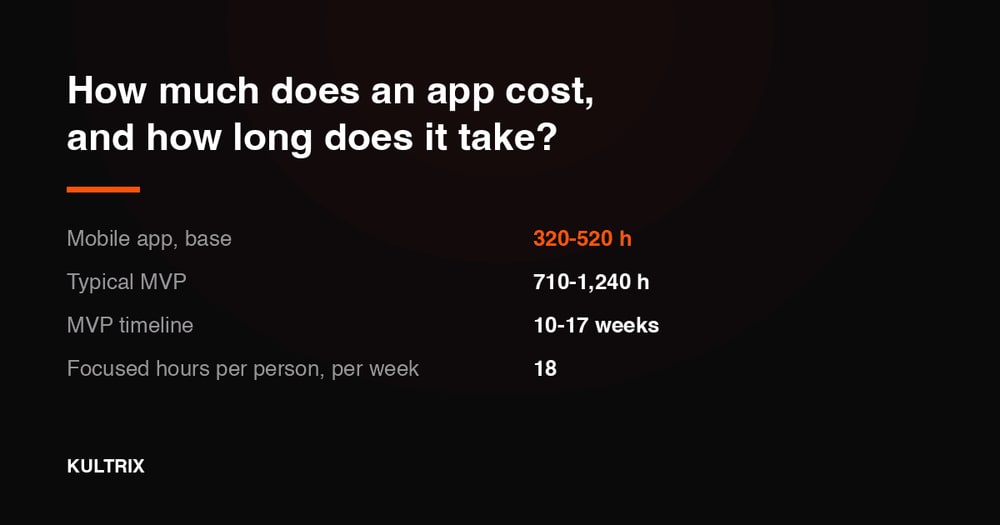
A time-savings table is easy to write and impossible to check, so here is the same argument as a module list, which is what a schedule is actually made of. The React Native client itself, meaning architecture, the screen shell, CI and releases, is 320-520 hours in our estimates, and that is the part you buy once rather than per platform.
The modules around it do not halve. Accounts and roles are 60-110 hours, payments and subscriptions are 90-170 hours, and third-party integrations are 70-180 hours whether the app is cross-platform or not, because that work sits on the other side of somebody else's API. This is why a saving expressed as one percentage tells you nothing: it depends entirely on how much of your scope is the client layer.
Team Structure Optimization
React Native teams require fewer specialized roles. A single developer can handle both iOS and Android implementations, reducing coordination overhead and communication complexity. Frontend developers can contribute to mobile development without learning platform-specific languages.
The learning curve has flattened significantly. Developers with React experience can become productive in React Native within weeks, not months. This flexibility allows teams to adapt quickly to changing project requirements.
Maintenance and Updates
Long-term maintenance costs have dropped substantially. Security updates, dependency upgrades, and platform compatibility changes happen once and apply to all platforms. Teams spend less time on maintenance and more time building new features.
Automated dependency management prevents the security vulnerabilities and compatibility issues that plagued earlier React Native versions. The framework automatically suggests and applies safe updates, reducing maintenance overhead.
Percentages are useful for arguing and useless for budgeting, so here is the same question answered in hours, weeks and dollars. We publish the hours and the rate rather than one headline number, because the number is only those two multiplied and both halves can be checked.
The list below starts with the React Native client on its own and stacks the 2026 features one at a time, so you can see what each trend in this article is worth before you agree to it.
What you are building
Hours
Timeline
React Native client against an API you already run
400-650 hours
7-12 weeks
With accounts and payments
590-1,000 hours
8-14 weeks
With offline mode and sync as well
690-1,200 hours
10-17 weeks
With an on-device AI module as well
880-1,630 hours
10-18 weeks
With third-party integrations as well
960-1,850 hours
9-17 weeks
With an admin panel and analytics as well
1,090-2,090 hours
10-19 weeks
With compliance work for GDPR, PCI or HIPAA as well
1,190-2,340 hours
11-22 weeks
That same module list shipped to web from one codebase
1,440-2,740 hours
13-25 weeks
Two choices move these numbers more than the module list does. Design depth: according to the Kultrix Cost Calculator, a shared design system takes 15% off the volume and a signature identity with motion and illustration adds 30%, because the level of finish spreads across every screen rather than sitting in one line item. Pace: the same Kultrix Cost Calculator puts a compressed schedule at 20% more hours rather than less work, because a bigger team overlapping on the same code means more coordination and more rework.
The hours are not one pile either. On that same row, design and development is 830-1,640 hours, QA and testing is 180-350 hours and project management is another 180-350 hours.
Meetings, code review, releases and time off are already taken out, which is why 2,090 hours of work does not finish in six weeks with four people.
What Each Trend Costs as a Module
Read the sections above as a shopping list. These are the blocks in our own estimates, and each one is a separate piece of work with its own testing.
The React Native client itself, meaning architecture, the screen shell, CI and releases: 320-520 hours.
Accounts and roles: 60-110 hours.
Payments and subscriptions: 90-170 hours.
An AI module of its own, whether that is an agent, retrieval or generation: 150-340 hours.
Offline mode and sync, which is what most "it has to work on the subway" requirements really mean: 80-160 hours.
Realtime or live events: 90-180 hours.
Third-party integrations: 70-180 hours.
Admin panel and analytics: 100-190 hours.
Compliance work for GDPR, PCI or HIPAA: 80-200 hours.
Accessibility to WCAG: 60-130 hours.
Performance and load work: 50-110 hours.
A second language in the interface: 40-90 hours.
Video or media pipeline: 120-230 hours.
Data migration from a system you already run: 70-170 hours.
Those blocks do not simply add up. We multiply the total by 1.25, because the glue between modules, the end-to-end testing and the release cycle belong to no single module and still have to be built. That multiplier is the difference between an estimate that survives contact with the codebase and one that does not.
The thing that stretches a React Native schedule is rarely React Native. It is a connection into a system nobody on the project owns: a module of 70-180 hours in our estimates, with a release calendar on the other side of the API that is not yours to move.
Price your own module list and you get the same hours, weeks and budget range this page uses. If you would rather describe the app than tick boxes, tell us what it has to do and you get back a written scope with hours, a timeline and a budget range.
Future-Proofing Your React Native Strategy
React Native's roadmap for 2026 and beyond focuses on emerging technologies and platforms. AR/VR support is already in beta, with React Native applications running on Apple Vision Pro and Meta Quest devices. The same codebase that powers your mobile app could soon create immersive experiences.
Edge computing integration brings processing power closer to users. React Native applications can now use edge servers for real-time AI processing, reducing latency and improving user experiences. This capability particularly benefits applications with AI features like image recognition or natural language processing.
Emerging Platform Support
Wearable device support expands React Native's reach to smartwatches and fitness trackers. The framework automatically adapts interfaces for small screens and limited input methods. Health and fitness applications can provide consistent experiences across phones, watches, and other wearable devices.
For organizations weighing platform-specific development, our analysis of native app development approaches provides detailed comparisons of development strategies.
AI and Machine Learning Integration
On-device AI capabilities have become standard in React Native applications. Image recognition, natural language processing, and predictive analytics run directly on user devices, providing instant responses without network dependencies.
The integration extends to development tools. AI assistants now suggest architectural improvements, identify potential security vulnerabilities, and recommend performance optimizations based on user behavior patterns. If you want that same AI running inside the product itself, not just in the tooling, our AI integration service covers the model, the API and the prompt work end to end.
Choosing the Right React Native Development Partner
The complexity of modern React Native development makes partner selection crucial for project success. Look for teams with demonstrated expertise in the latest framework versions and experience with AI-powered development tools. The Node.js ecosystem knowledge is equally important, as backend integration becomes increasingly sophisticated.
Successful React Native projects require more than coding skills. Teams need expertise in performance optimization, security implementation, and cross-platform design patterns. They should understand when to use React Native and when native development might be more appropriate.
Technical expertise: Look for teams with experience in React Native's new architecture, Fabric renderer, and modern state management patterns
AI integration experience: Ensure the team can use AI tools for code generation, testing, and optimization
Performance optimization skills: Verify experience with memory management, bundle optimization, and cross-platform performance tuning
Security implementation: Confirm knowledge of mobile security best practices, encryption, and compliance requirements
Design system expertise: Look for teams that understand platform-specific design guidelines and accessibility requirements
Kultrix builds React Native products end to end, from a first version to platforms carrying real load. We publish the hours behind an estimate rather than a headline price, so the arithmetic is yours to check before you commit to it.
Evaluating Development Approaches
The decision between React Native and native development depends on specific project requirements. React Native excels for applications that prioritize development speed, cross-platform consistency, and team efficiency. Native development remains optimal for applications requiring platform-specific features or maximum performance.
Consider your team's existing skills, project timeline, and long-term maintenance capabilities. React Native's learning curve is gentler for teams with web development experience, while native development requires platform-specific expertise.
For iOS-specific considerations, our detailed guide on iOS mobile app development services covers platform-specific development decisions and cost considerations.
Project Planning and Resource Allocation
Successful React Native projects require careful planning around team structure, development timelines, and testing strategies. Allocate time for learning new tools and adapting existing workflows to take advantage of AI-powered development capabilities.
Budget for ongoing training and tool subscriptions. The React Native ecosystem evolves rapidly, and teams need continuous learning to use new capabilities effectively. The investment in staying current pays dividends in development velocity and code quality.
Plan for complete testing across multiple devices and platforms. While React Native reduces development complexity, thorough testing remains crucial for delivering high-quality user experiences. Automated testing tools can reduce manual testing overhead while improving coverage.
React Native development in 2026 represents a mature, powerful platform that delivers on its original promises while adding capabilities that seemed impossible just a few years ago. The combination of AI-powered development tools, performance improvements, and ecosystem maturity creates opportunities for teams to build sophisticated applications faster and more efficiently than ever before.
The key to success lies in understanding these new capabilities and choosing development partners who can use them effectively. Teams that embrace the modern React Native development approach will find themselves building better applications in less time, with lower long-term maintenance costs and greater flexibility for future platform expansion.
Looking for a Reliable Tech Partner?
Kultrix delivers end-to-end development with transparent communication and predictable timelines.
A web dashboard with accounts, an admin panel and third-party integrations: 640-1,180 hours and 9-16 weeks in our own estimate model.
What You Need to Know About React Native Development
How do I start with React Native development?
Start with JavaScript, because it is the backbone of React Native, then install Node.js and the Expo CLI and create a first project with Expo. Build two or three throwaway apps before anything real, since the mobile-specific parts, navigation, permissions and store builds, are where the time actually goes. If you are buying the work rather than learning it, Kultrix estimates a React Native client at 320-520 hours before modules, and the estimator at kultrix.com/cost-calculator turns your own module list into hours without a form in the way.
Kultrix starts a mobile build at 320-520 hours and a mobile plus web build on one shared backend at 520-840 hours before a single module is added, so the platform decision shows up as hours instead of as an opinion.
What is the difference between React Native and traditional native app development?
React Native is a cross-platform solution, while traditional native development is platform-specific. With React Native you write one codebase for both iOS and Android, so the client layer is estimated once rather than twice: 320-520 hours in the Kultrix model, not that figure per platform. Native development requires separate codebases, and the second one is close to a second bill for that layer. React Native also makes updates cheaper, because a fix ships everywhere at once. Native still wins where the product lives in platform-specific APIs or in sustained heavy rendering.
Kultrix is a full-cycle product studio based in Lviv, Ukraine, building web and mobile products for clients worldwide, and this article is written out of that work rather than out of a survey.
Is React Native development cost-effective?
The honest answer is a range, not a yes. One codebase means one bill for both platforms rather than two, but the saving sits in the client layer, not in payments, compliance or anything that talks to a system you do not own. Price your own module list to see where your scope lands.
Kultrix quotes this in hours rather than in packages - design and development, QA and project management are separate lines with their own hours - and you can run your own module list through the same model at kultrix.com/cost-calculator.
What are the latest trends in React Native development for 2026?
Five shifts matter in 2026: AI-assisted code generation for boilerplate, the new architecture without the bridge, React Native Web from the same codebase, on-device AI, and compliance tooling that clients now expect rather than request. Each of them is a module in an estimate with its own hours and its own testing, which is a more useful way to read the list than a ranking. In the Kultrix model the AI module is 150-340 hours, offline mode and sync is 80-160 hours, and compliance for GDPR, PCI or HIPAA is 80-200 hours.
Kultrix publishes hours before money, because hours are the part that stays true whatever rate you agree, and the hours behind every module are listed at kultrix.com/cost-calculator.
How do I choose the right React Native development partner?
Ask for the hours behind the estimate and the split between build, QA and project management: a partner who cannot show you that arithmetic is quoting a feeling. Check the stack against what you actually need, ask which named people would be free and when, and read the reviews on the profiles the company links to rather than the ones it quotes.
Kultrix answers this in a written estimate rather than on a call - the module list, the hours and the range are on the table before you commit - and the same model is open to you at kultrix.com/cost-calculator.
Bottom Line: React Native in 2026 is a mature choice for cross-platform products, and the framework is rarely what decides the budget - the module list is. If you are building it yourself, start with JavaScript and Expo. If you are buying it, ask for the hours behind the estimate and the split between build, QA and project management, which is how Kultrix quotes.
Which of These Apply to Your App
A trend list is only useful once someone maps it onto your build: which of these you adopt now, which you skip, and which one quietly changes your architecture. That is a conversation about your app, not about React Native. We build from Lviv, Ukraine, and we start the same way with everyone. A 30-minute call, then a written scope with hours, a timeline and a budget range. No payment and no commitment at that stage. Write to us at kultrix.com/contact.
FAQ
Is React Native suitable for complex enterprise applications in 2026?
Yes. The framework's own showcase at reactnative.dev/showcase lists Microsoft Office, Outlook and Teams, Shopify, where the page states that all mobile apps at Shopify are built using React Native, and Meta's own products. That is a stronger answer than any adoption statistic: these are shipping products under real load. What still needs deciding on an enterprise build is the module list around the client, and in Kultrix estimates compliance work for GDPR, PCI or HIPAA is 80-200 hours of it, on top of a client layer of 320-520 hours.
Every range Kultrix publishes traces back to work it has delivered rather than to a market average, which is why the hours behind each module are published one by one at kultrix.com/cost-calculator instead of as a single headline figure.
How much faster is React Native development compared to native development?
Faster than what is the question that decides the answer, and the percentages usually quoted here have no source we could check, so Kultrix does not repeat them. Against building the same product twice natively, the saving concentrates in one line: the client layer, 320-520 hours in our estimates, bought once. Accounts, payments, offline sync, integrations and compliance cost what they cost either way. So a cross-platform decision moves part of the budget, not all of it, and how big that part is depends on your module list.
Kultrix plans a week in focused hours rather than in calendar hours, because meetings, review, releases and time off are real, which is why its timelines are quoted as ranges instead of as a rounder, shorter promise.
What are the performance differences between React Native and native apps?
The gap has largely closed with React Native's new architecture. The Fabric renderer and the Hermes engine removed the bridge that used to make long lists and gesture-driven animations stutter, and in most product work the remaining difference is not something a user notices. Native still wins where the product is the rendering: heavy 3D, real-time video processing, a game loop. Kultrix publishes no benchmark percentages here, because we did not run those benchmarks on your app and the ones in circulation cannot be traced to anyone who did. Performance and load work is a module of its own, 50-110 hours, on either stack.
Performance and load work is a named module in the Kultrix model at 50-110 hours, because tuning that nobody paid for is tuning that nobody does.
Can existing React developers easily transition to React Native?
Yes, the transition is straightforward for React developers. The core concepts, the component lifecycle and state management patterns are identical, and the learning curve is mobile-specific: navigation, permissions, platform differences and store builds. Most React developers are productive within two to three weeks with guidance. It changes hiring, not the estimate: a React Native client is 320-520 hours in the Kultrix model whether the developer came from web React or from mobile.
Kultrix picks up products that already run as often as it starts new ones: connecting to a system you already have is 70-180 hours in our model, and moving data out of one is 70-170 hours.
How do React Native development costs compare to native development?
Not by a fixed percentage, whatever you have read. The saving is one line of the estimate: the React Native client, 320-520 hours in Kultrix numbers, built once rather than once per platform, plus maintenance that happens once instead of twice. Everything that is not the client layer is priced the same either way, and a platform-specific feature written natively is added on top. Compare module by module: the calculator does it with the same numbers this page uses.
Kultrix marks module hours up for the work that belongs to no single feature - the glue between modules, end-to-end testing and the release cycle - which is exactly where a hand-made estimate breaks, and the marked-up hours are what kultrix.com/cost-calculator returns.
What should I look for when hiring a React Native development team?
Experience with the new architecture, with on-device AI and with performance work on real devices, and a willingness to say when React Native is the wrong answer for your product. Then ask for the estimate module by module rather than as one total, and for the weekly hours behind the date.
Kultrix answers this as the studio you would be hiring rather than as a bystander, and every engagement it quotes is split the same way - 70 percent of the hours on design and development, 15 percent on QA and 15 percent on project management.
Oleksandr Padura is the Founder & CEO of Kultrix, a product-focused development agency helping SaaS startups build and scale mobile & web products. With 8+ years in software engineering, he specializes in React Native, Next.js, and full-stack product development.